For clinics, labs, pharmacies and medical wholesalers
Run your clinic, lab and pharmacy from one app, even without internet.
Quezlo Hospital & Wholesale Management covers reception tokens, the doctor's desk, lab reports, the pharmacy counter, purchases, stock, credit, accounts and staff. It runs on your own computers, keeps your records with you, and works in Roman Urdu or English.
Quezlo Hospital is in testing. The Windows, Android and web versions are test builds that we share directly. It is not on Google Play or ready to download yet.
Ready in 3 steps
No account to make. You only need the licence key we give you.
1
Enter your licence key.
Type the 16-character key (it starts with QZ) and press Activate. It is checked online, and then the app works offline for up to 7 days between checks.
2
Answer the setup wizard.
Pick your business type (clinic, pharmacy, wholesale agency and more), add your name, address and logo, turn on the modules you need, choose the bill scanner, and add staff logins with roles if you want.
3
Start working.
Register the first patient, sell from the counter or enter a purchase bill. Add more computers on your own network whenever you are ready.
You can change the modules, staff logins and bill design later in Settings.
Everything from the front desk to the godown
Reception and tokens
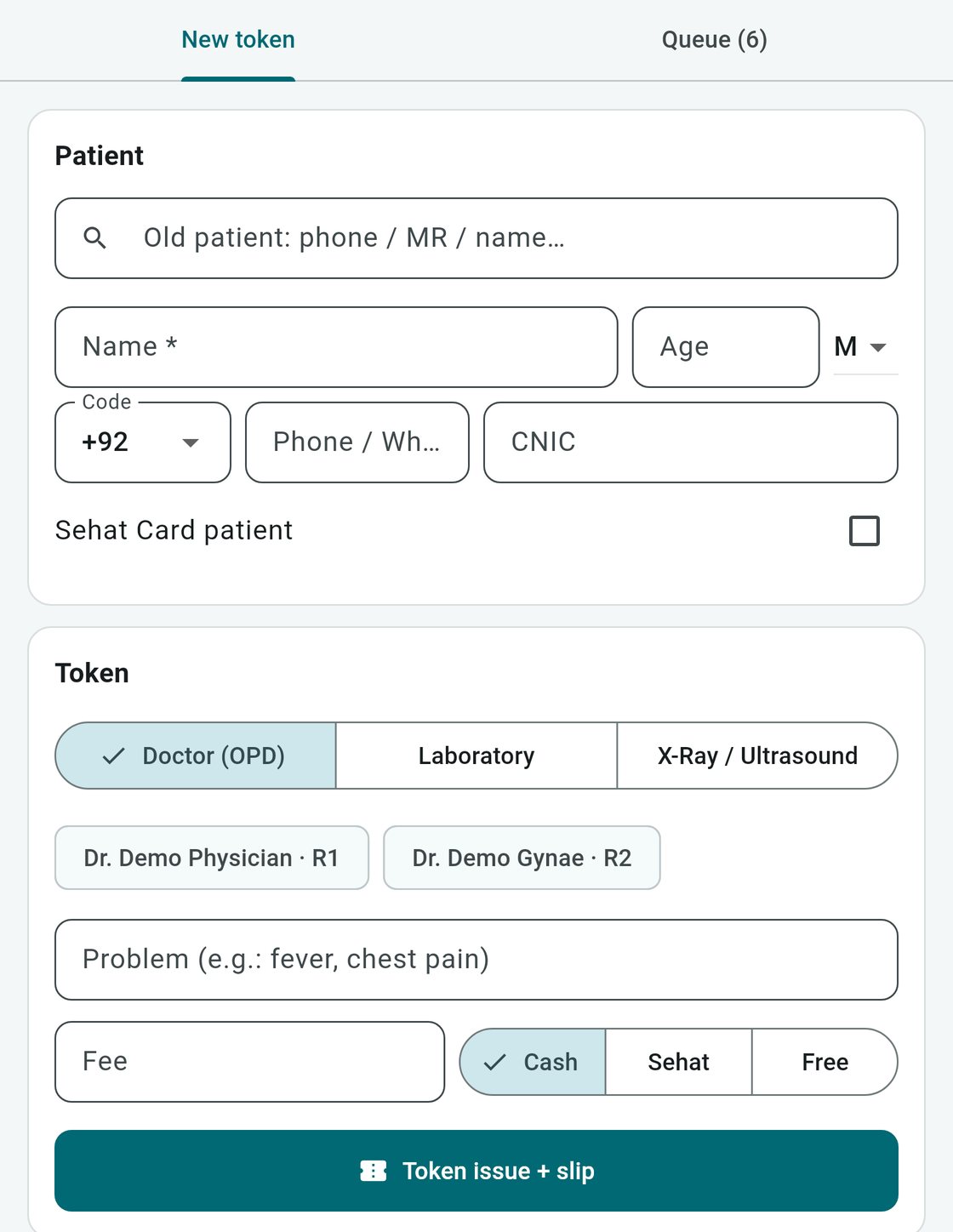
Register a patient once, then find them again by phone, MR number or name. Give a doctor or lab token and print the slip.
Patient record with MR number, age, phone and an optional Sehat Card mark
Doctor and lab tokens with a printed slip
Today's queue: who is waiting and who is inside
TV token display that calls the next number out loud with the device's voice
Reception: register a patient and issue a token. The X-Ray / Ultrasound tab only issues a queue token; X-Ray reports are coming later. Sehat marks the fee as paid by Sehat Card and is not a claim (demo data).
Doctor desk and prescriptions
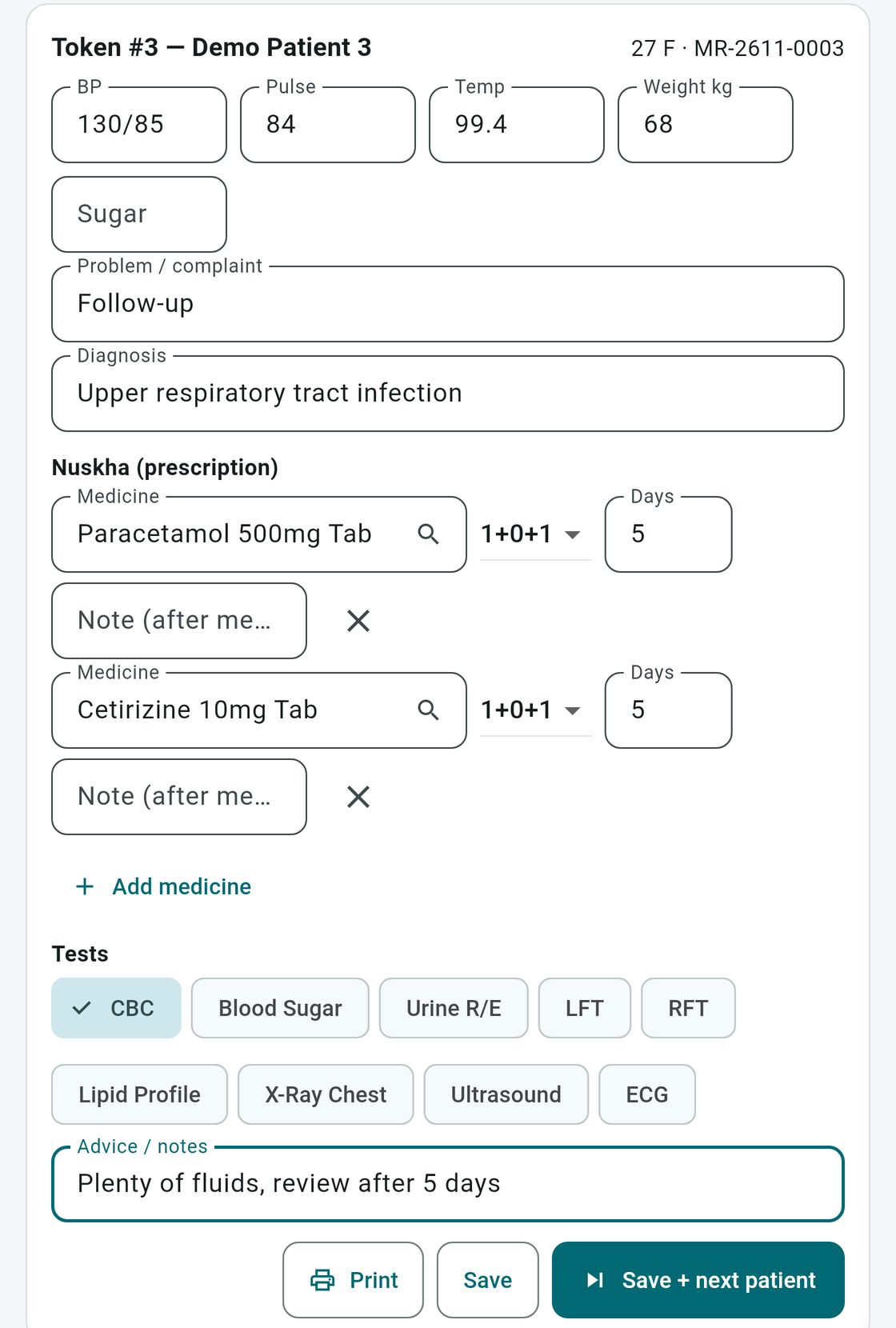
The doctor sees the patient called in, with their past visits, and writes everything in one place.
Vitals, complaint, diagnosis and notes
Prescription (nuskha) with the medicines
Tick tests: when the visit is saved, tests on the lab's list go to the lab worklist (with the lab module on); X-Ray, ultrasound and ECG ticks are only noted on the visit and do not create an order
The pharmacy counter can pick up the prescribed medicines by token number
Doctor desk: vitals, diagnosis, prescription and tests. Ticked lab tests such as CBC go to the lab; X-Ray, ultrasound and ECG ticks are only noted on the visit, not sent anywhere (demo data).
Laboratory with High and Low flags
14 common tests are ready to use, such as CBC, blood sugar, HbA1c, liver and kidney function, lipid profile, urine R/E, Typhidot, hepatitis B and C, ESR and blood group. Add your own tests and rates too.
The doctor's test orders arrive in the lab worklist
Collect the test fee at the lab
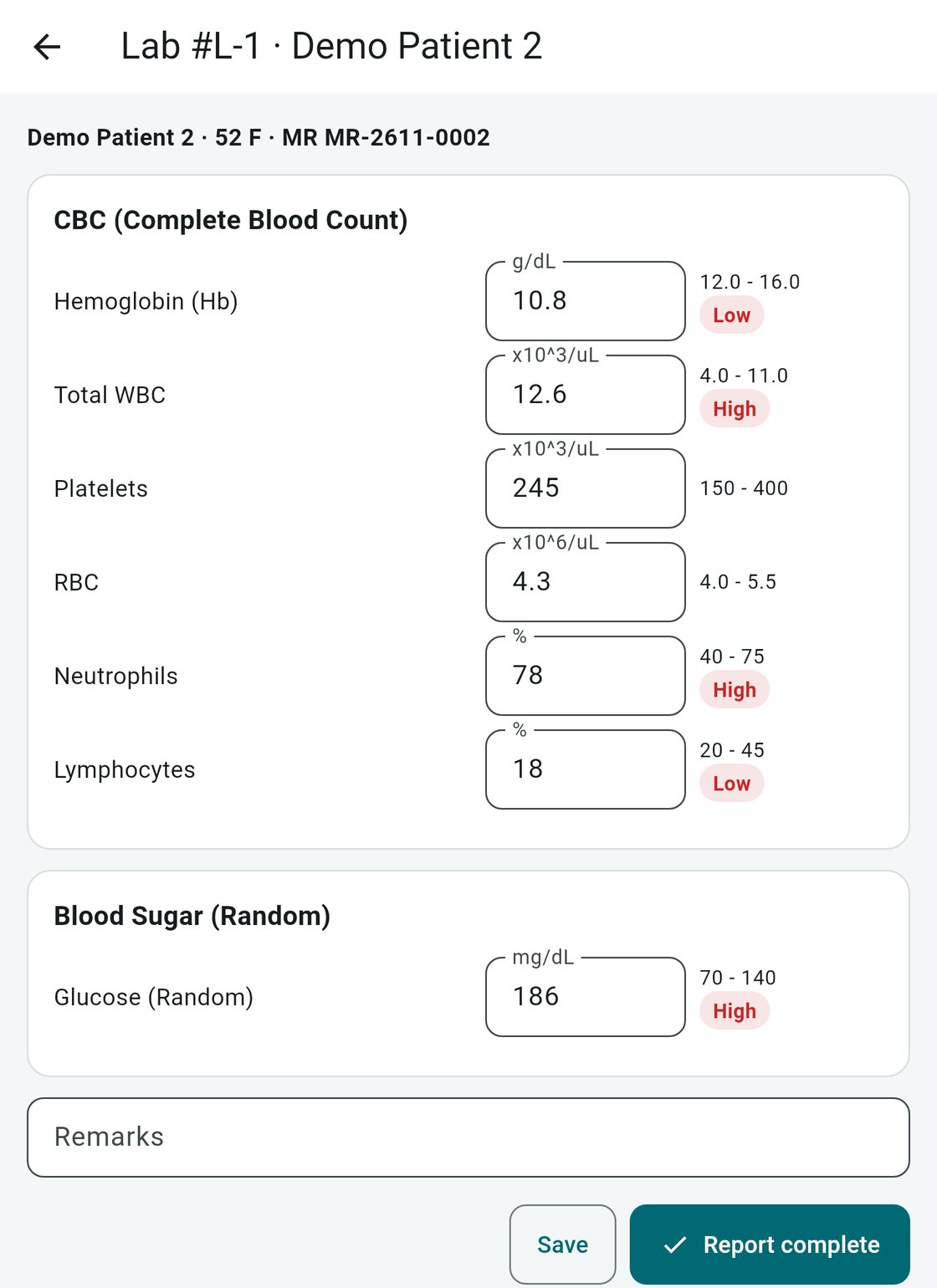
Values with a normal range are checked against it and flagged High or Low
Print the report, save it as a PDF or send it on WhatsApp
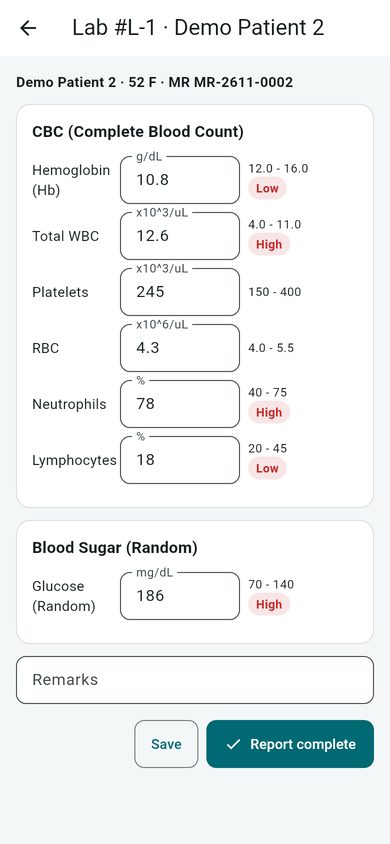
Lab results: values with a normal range are checked against it and flagged High or Low (demo data).The lab results screen at phone width (demo data).
Pharmacy counter (retail POS)
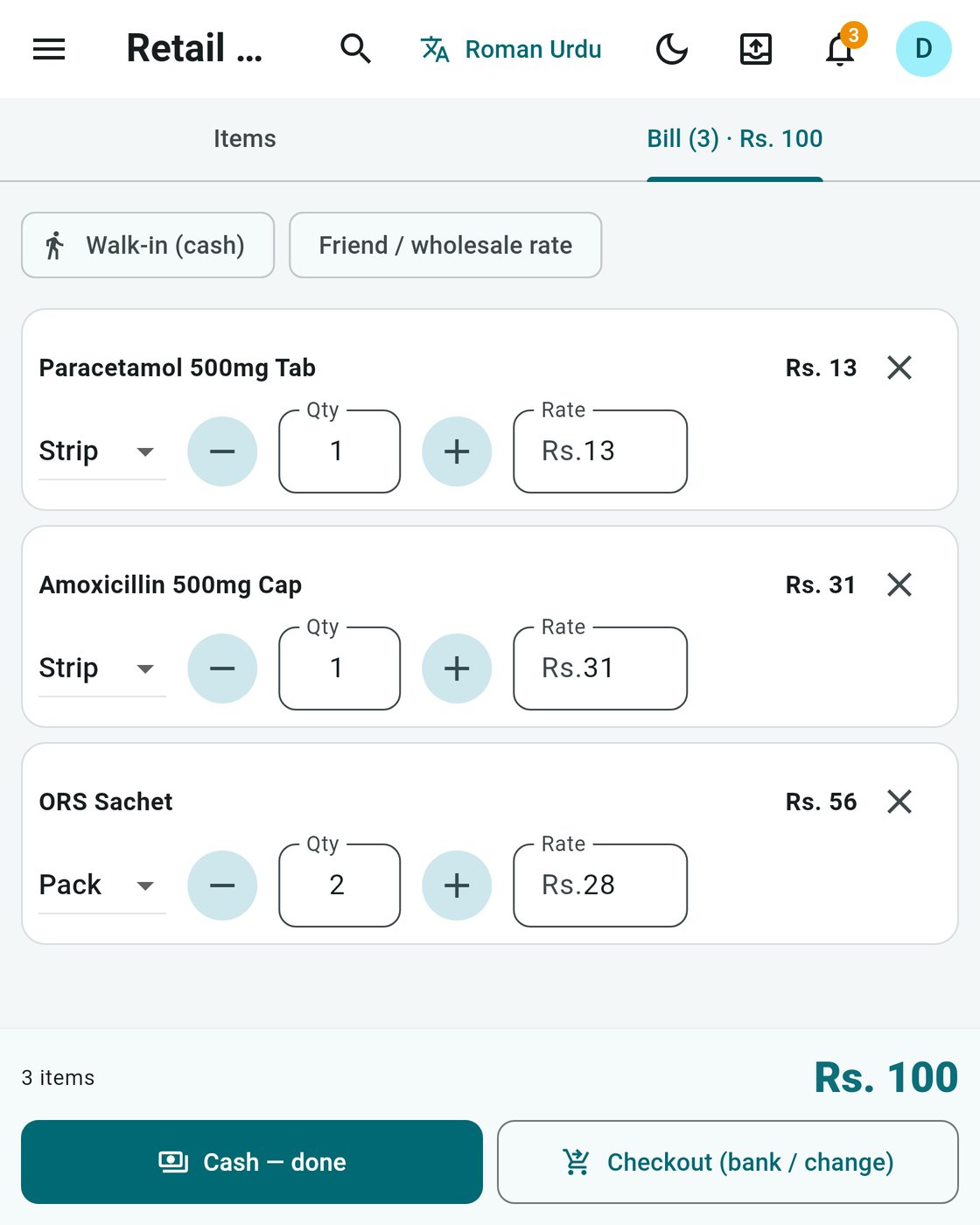
Scan a barcode or type a medicine name. The list shows stock, generic name and expiry, so the counter never guesses.
Sell by strip, box or pack
Walk-in cash sale in one click, or bank and change at checkout
Friend or wholesale rate when you need it
Medicine by token: load the doctor's prescription from the token number
Retail counter: sell by strip or pack and finish a cash sale in one click (demo data).
Purchases from a bill photo
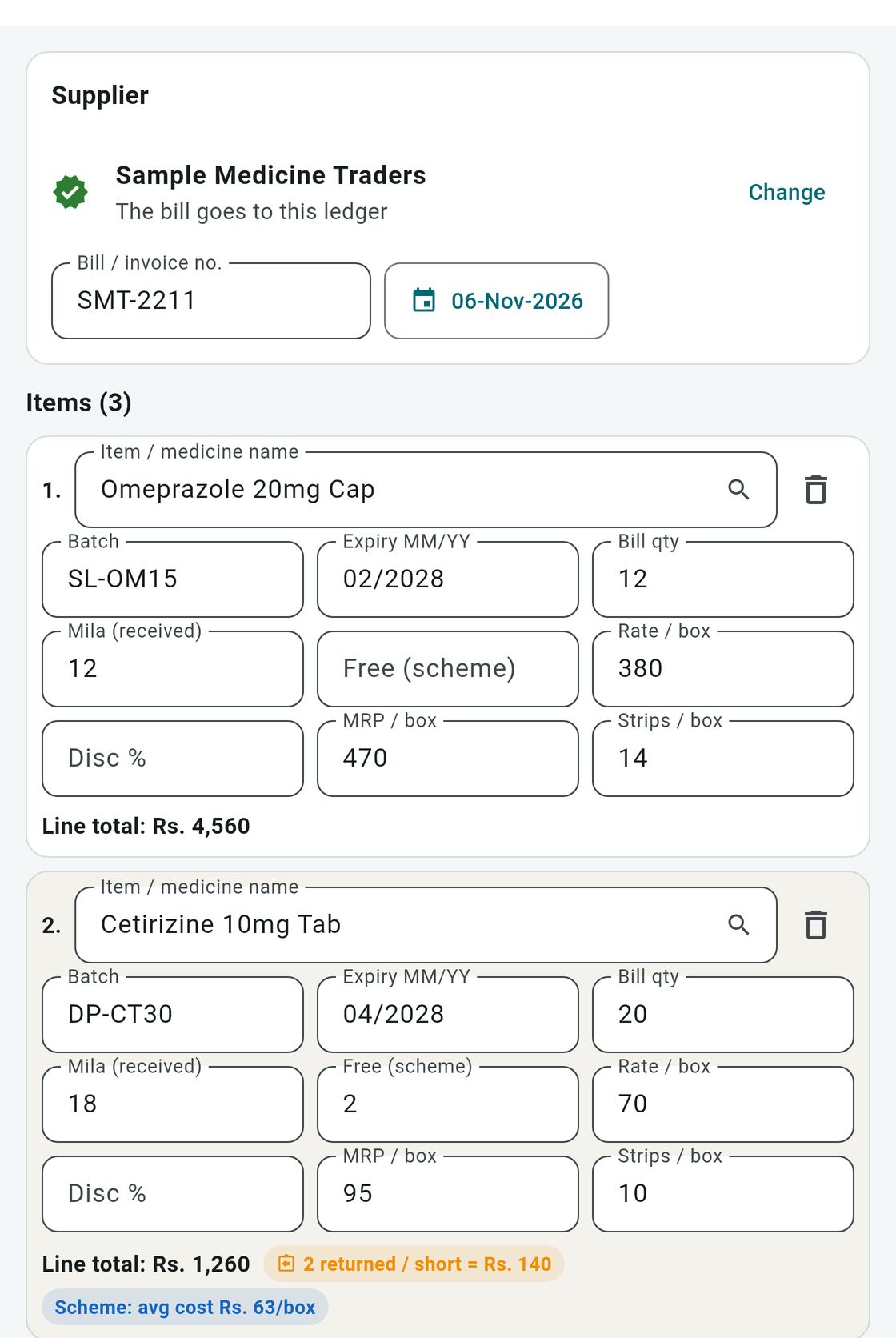
Take a photo of the supplier's bill or scan it. The app reads it into a draft, and you check each line before it goes into stock.
Free scanner: reads the bill on the Windows computer or Android phone itself, no internet needed (not in the web version)
Optional Google AI scanner with your own Google key: the bill photo is sent to Google
Batch, expiry, billed and received quantity on every line
Free-quantity schemes such as 10+1, rate alerts, split payments and purchase returns
Purchase bill draft: check every line before it goes into stock (demo data).
Godown and stock
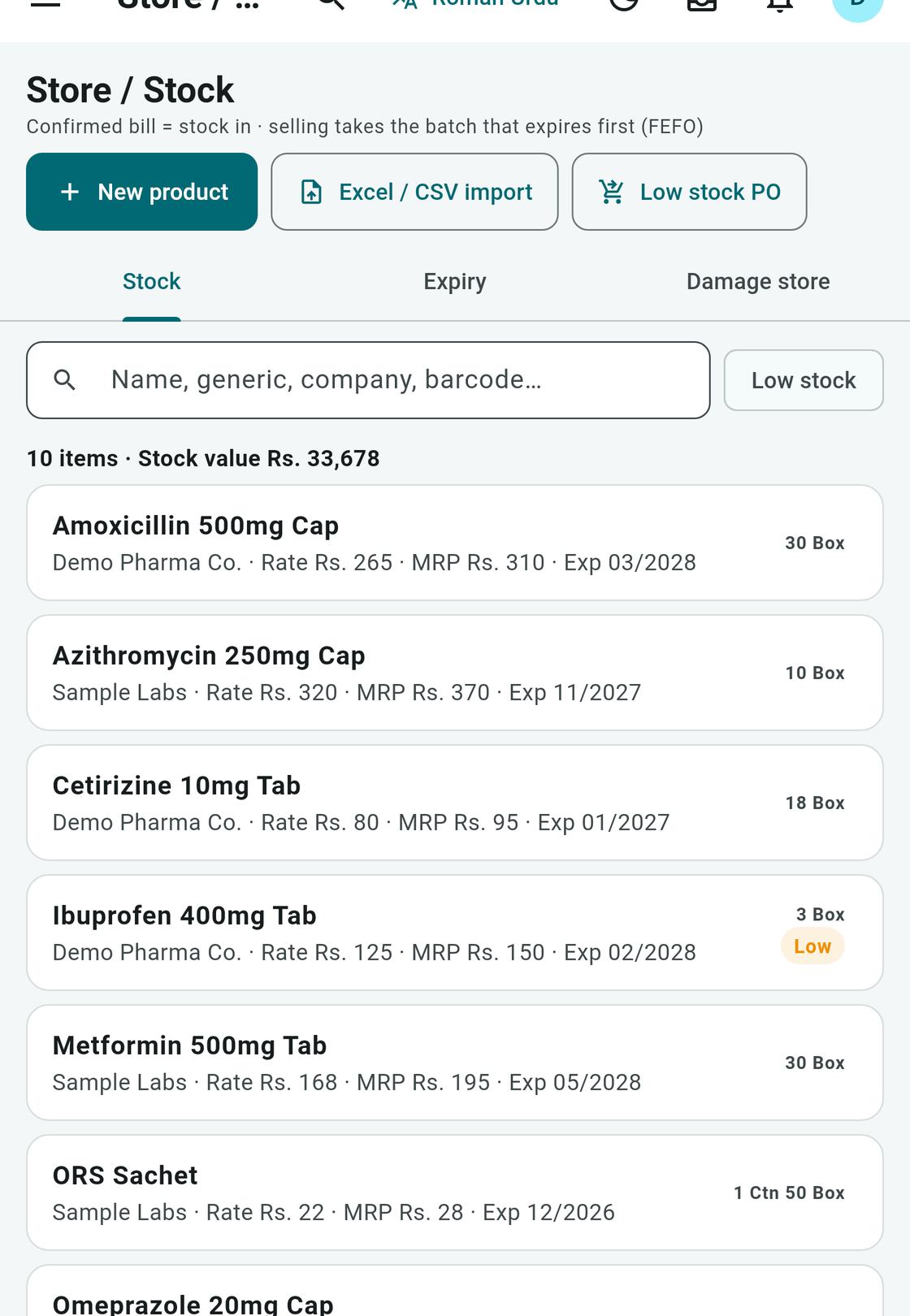
Keep stock the way a medical store really does: cartons, boxes and strips, each with its batch and expiry.
Batches with expiry: selling takes the batch that expires first (FEFO)
Expiry and low-stock alerts on the dashboard
Damage godown and stock audit
Import your products and opening stock from Excel (saved as CSV)
Stock: company, rate, MRP, expiry and low-stock flags (demo data).
Sales, credit and bills
For wholesale agencies and stores that sell on credit: every bill numbered, every change recorded.
Customer rates and discounts, and returns at checkout
Credit limits per customer, with an owner override
Kacha khata (rough credit notes) with a reminder at closing time
17 bill designs for A4 or thermal receipt printers (80 mm or 58 mm), printed through Windows
Send the receipt as a PDF or on WhatsApp
Accounts and day closing
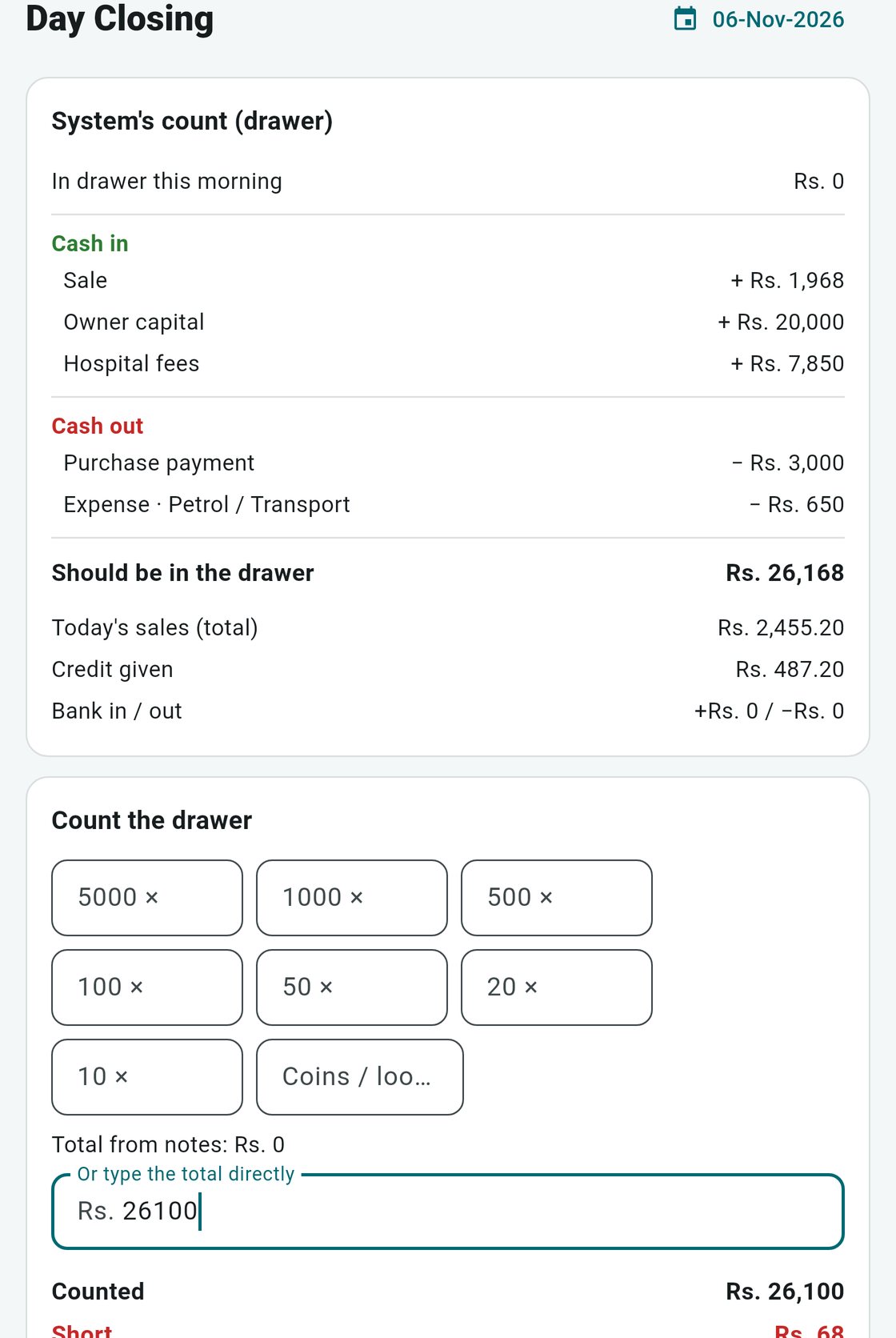
See where the money went today, and close the day with the cash you actually counted.
Cashbook, expenses with receipt photos, and owner drawing
Day closing: what should be in the drawer, what you counted, and any shortfall
Profit, amounts to receive and pay, and dead stock
Day closing: what should be in the drawer, what you counted, and any shortfall (demo data).
Dashboard: the day at a glance
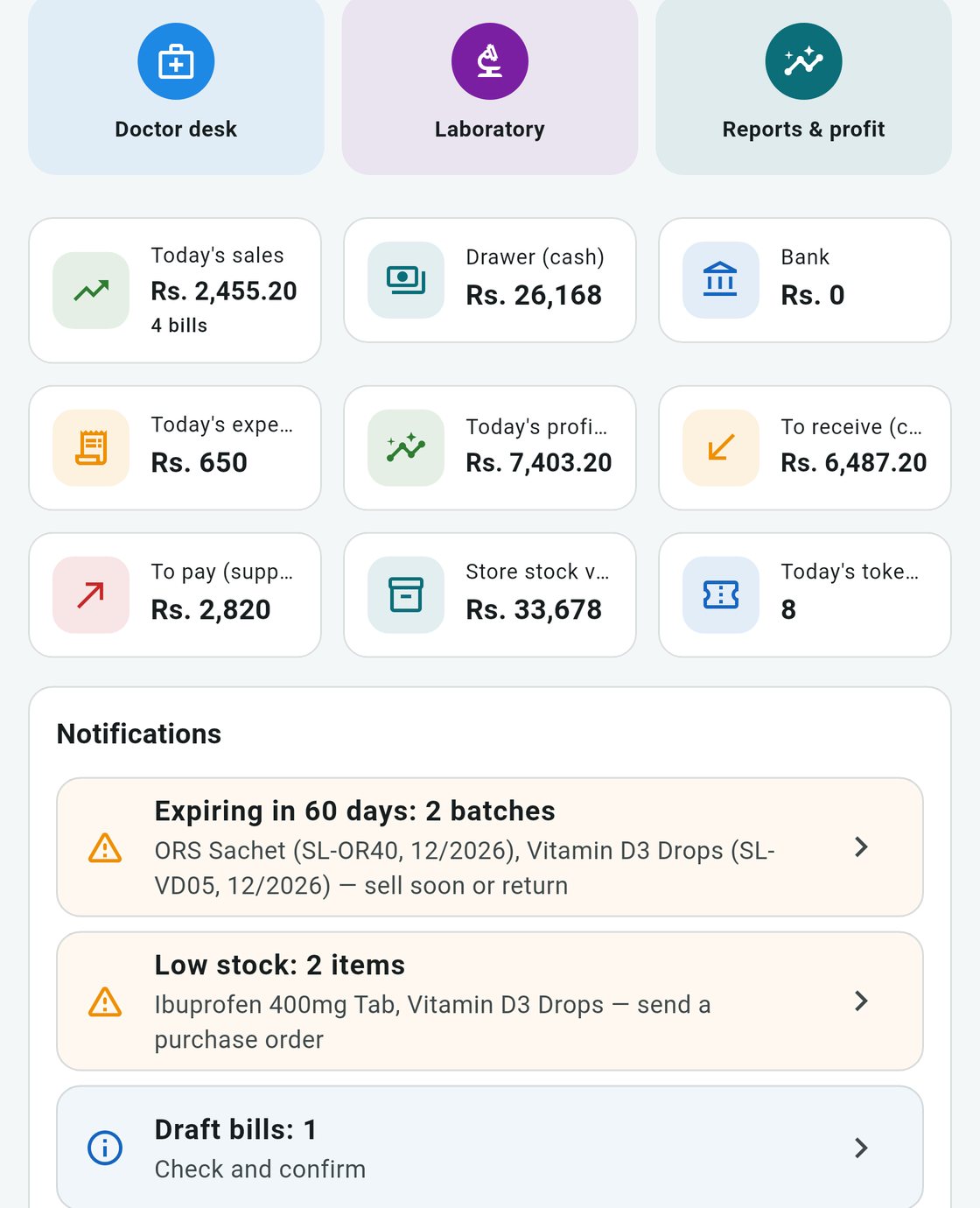
The first screen shows today's figures, with shortcuts to every desk.
Today's sales, cash in the drawer, bank and expenses
Today's profit, amounts to receive and pay, and the stock value
Today's token count
Expiry and low-stock notifications, and draft bills waiting to be checked
The dashboard: today's figures and expiry, low-stock and draft-bill alerts (demo data).
Staff, attendance and salary
Simple HR for a small clinic or agency.
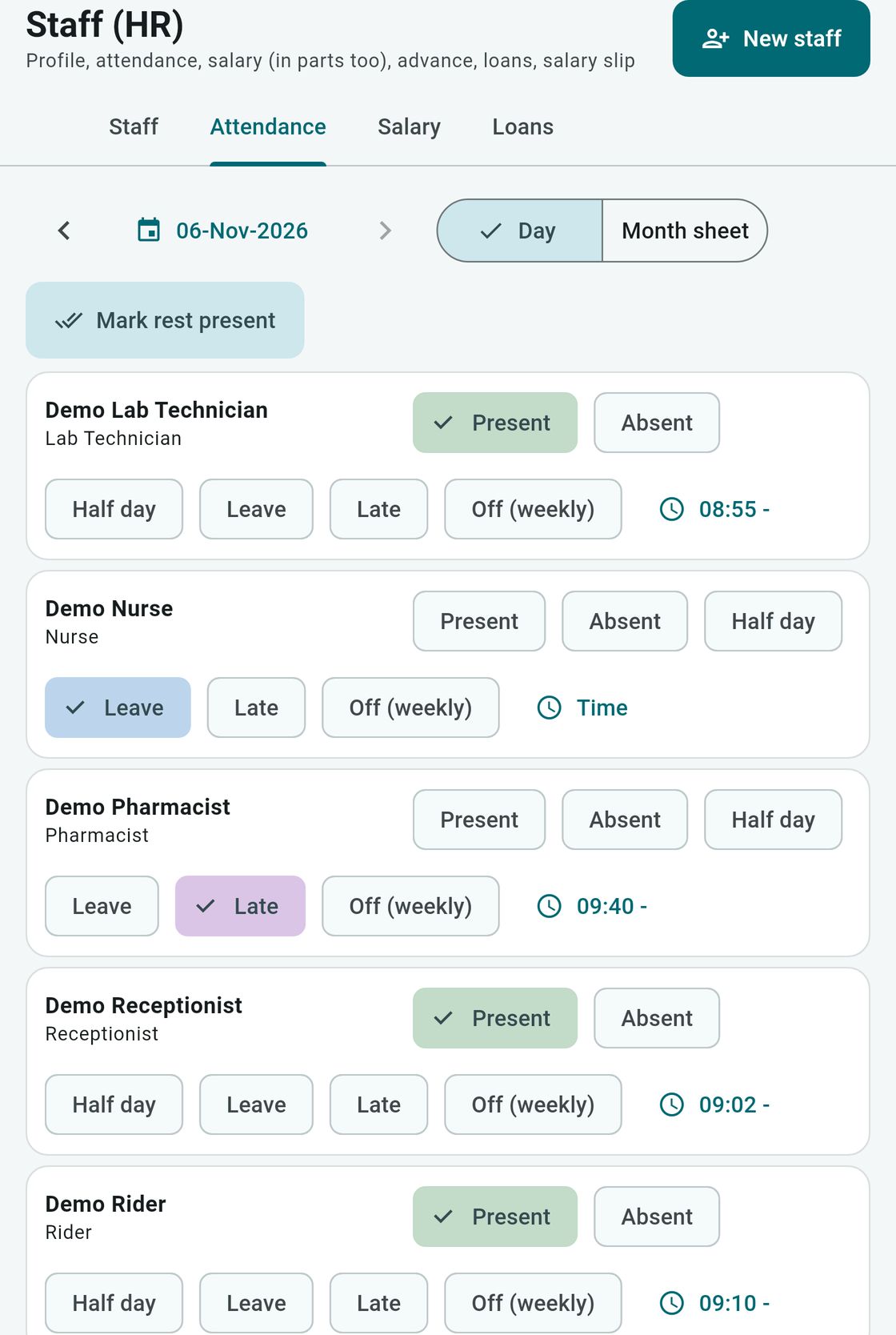
Daily attendance: present, absent, half day, leave, late or weekly off, with the time in
Salary (also in parts), advances, loans and salary slips
A separate login for each staff member, with only the role they need: receptionist, doctor, lab tech, pharmacist, accountant and more
Staff attendance: mark each person present, on leave or late, with the time in (demo data).
Roman Urdu or English, light or dark
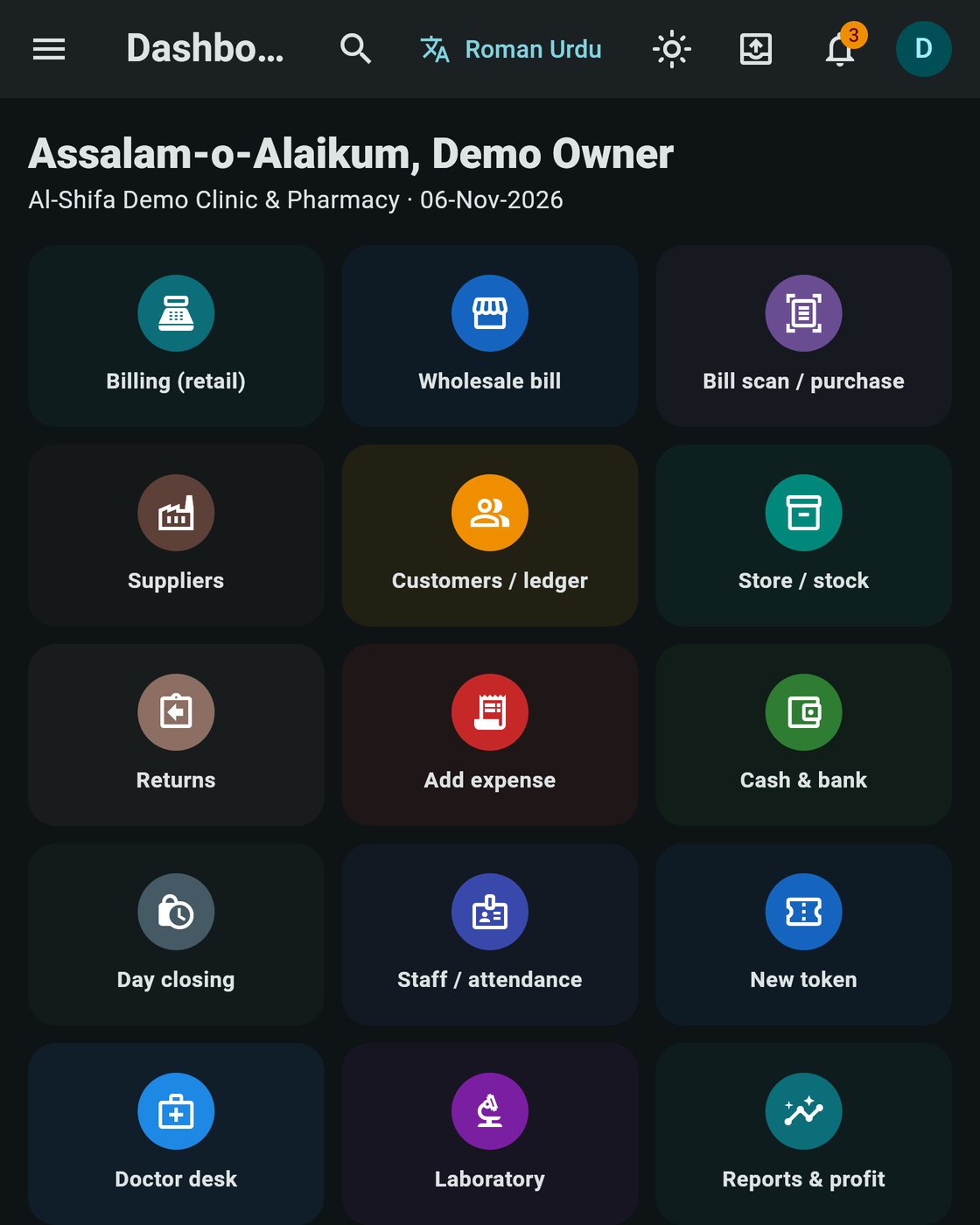
The app starts in Roman Urdu. Switch to English with the button at the top, and back again any time.
Light and dark themes
Search any screen with Ctrl+K
Works offline: reception, doctor desk, lab, sales, stock and accounts need no internet (the licence is checked online at least once every 7 days)
The dashboard in the dark theme, with the Roman Urdu button at the top that switches the language (demo data).
Several computers, one database
Run reception, the doctor's room, the lab and the counter on separate computers. One computer is the server, and the others connect to it over your own network (Wi-Fi or cable). Everyone sees the same patients, stock and bills, without internet.
On your own network
Reception computer
Doctor's computer
Lab computer
Pharmacy counter
Android phone or tablet
Web browser (client only)
Main computer (server)
Licence check only, now and then
Quezlo licence server
The connection between your devices is not encrypted. It is protected by a 4-digit PIN. Use it only on a private network you trust, never on public Wi-Fi.
Made for clinics, labs, pharmacies and wholesalers
Clinics and dispensaries
One or two doctors with a small medical store: tokens, doctor desk, prescriptions and the counter.
Diagnostic labs
Lab tokens, the worklist, results with High and Low flags, and reports on paper, PDF or WhatsApp.
Pharmacies and medical stores
Fast counter sales by strip or pack, purchases from bill photos, batches and expiry alerts.
Medical wholesalers and agencies
Supplier bills, schemes, customer rates, credit limits, kacha khata and a godown with cartons, boxes and strips.
Your data stays with you
Patient, staff, stock and account records are kept in a database on your own computers and phones. There is no Quezlo account and no cloud sync. Your clinic or business is in charge of this data. Quezlo only receives what the licence check needs: the licence key, a random device ID made by the app, the device name and your business name.
No ads and no analytics in the app
Health data leaves your devices only when your staff send, print or back it up
The Google AI scanner, WhatsApp Cloud API and Gmail are optional, and use your own key or account
Backups are not encrypted, so keep the file somewhere safe. Newer test builds leave out your Google AI key, WhatsApp token and Gmail app password; backups made by older test builds may still contain them
Several computers talk over your own network only. This connection is not encrypted, so use a private network you trust
Best for: The main computer, and every desk and counter
Everything, including the free bill scanner, direct scanning from a scanner, the LAN server and optional Gmail sending. Windows 10 or 11, 64-bit.
Installer coming soon
Android
Test build
Best for: A phone or tablet beside the main computer
The same app on Android, with the free bill scanner. Use it on its own or connect it to your main computer over your network. Shared as an APK file.
Not on Google Play yet
Web
Test build
Best for: Opening the app from a browser
Runs in a browser and keeps the data in that browser, or connects to your main computer. The free scanner, LAN server, Gmail and direct scanning are not available here.
Shared on request
Technical details
Editions of Quezlo Hospital & Wholesale Management
Edition
ID
Status
Notes
Windows
—
Test build
Windows 10/11 64-bit. Installer Quezlo-Setup-Windows.exe, version 1.0.x. Not code-signed yet.
Android
com.quezlo.hms
Test build
Shared as an APK file. Not on Google Play yet.
Web
—
Test build
Runs in a browser. Data is stored in that browser's storage. The free scanner, LAN server, Gmail and direct scanning are not available on the web.
Coming later
These are not in the app yet. We will say so here when they arrive.
Wards (IPD)Not yet available
X-Ray and ultrasound reports (today there is no X-Ray module: reception can only issue an X-Ray / Ultrasound queue token)Not yet available
EmergencyNot yet available
Operation theatre (OT)Not yet available
Sehat Card claims (today the app only marks a patient as a Sehat Card holder)Not yet available
Cloud syncNot yet available
iPhone and iPadNot yet available
Video guides on YouTubeNot yet available
Questions and answers
Do I need internet?
Only for the licence check. After the key is checked, the app works offline for up to 7 days between checks. Reception, the doctor desk, the lab, sales, stock and accounts all work without internet. The Google AI scanner, WhatsApp Cloud API and Gmail need internet when you use them.
How many computers can use it?
Each licence has a device limit, set when you get the licence. Several computers, phones and tablets can share one database over your own network: one computer is the server and the others connect to it.
Is patient data sent to Quezlo?
No. Patient, staff, stock and account records stay on your own devices. Quezlo only receives the licence check: the licence key, a random device ID made by the app, the device name and your business name.
Is the connection between our computers safe?
It is protected by a 4-digit PIN but it is not encrypted. Use it only on your clinic's own private network, never on public Wi-Fi.
How do backups work?
Open Settings, then Backup, to save all your data in one file, and restore it on any device. The file is not encrypted, so keep it somewhere safe, away from the computer. Backups from newer test builds leave out your Google AI key, WhatsApp token and Gmail app password. Backups made by older test builds may still contain them, so if you are not sure which build you have, ask us.
Can it send lab reports and receipts on WhatsApp or by email?
Yes. By default the app opens WhatsApp with the message ready, and you press send. You can also connect the WhatsApp Cloud API or Gmail with your own account, and then the app sends them itself. Gmail is not available in the web version.
Does it work in Urdu?
It works in Roman Urdu and English. It starts in Roman Urdu, and one button at the top switches between the two.
I only run a pharmacy or a wholesale agency. Is it for me?
Yes. In the setup wizard you pick your business type and turn on only the modules you need, such as the retail counter, purchases, stock, sales and accounts.
Does it have wards (IPD), X-Ray, emergency or Sehat Card claims?
Not yet. Wards (IPD), X-Ray reports, Emergency, the operation theatre and Sehat Card claims are coming later. Today you can mark a patient as a Sehat Card holder, and reception can give an X-Ray / Ultrasound queue token, but there are no X-Ray reports yet.
How much does it cost?
Plans will be announced soon.
System requirements
Windows
Windows 10 or 11, 64-bit
Installs for your user account. No administrator rights needed.
Not code-signed yet. If Windows SmartScreen shows a warning, choose More info → Run anyway, but only for a file you got from us.
The free bill scanner uses Windows' built-in text recognition (part of Windows 10 and 11).
Android
An Android phone or tablet.
The app is shared as an APK file and is not on Google Play yet. Android may ask you to allow installs from that source.
Web browser
A modern browser on a computer. The data is kept in that browser.
The free bill scanner, LAN server, Gmail and direct scanning are not available on the web.
Several devices (LAN)
One device is the server (usually the main computer) and every device is on the same private network, by Wi-Fi or cable.
Internet only for the licence check (at least once every 7 days) and the optional online services.
Want to try it at your clinic or store?
Quezlo Hospital is not on Google Play or ready to download yet. Tell us about your clinic, lab, pharmacy or agency and ask for a test build, and we'll help you set it up.